> ## Documentation Index
> Fetch the complete documentation index at: https://craft-support.mintlify.site/llms.txt
> Use this file to discover all available pages before exploring further.
# 外部位置
> 将 Craft 文档存储在设备本地,而不是云端。
**Craft 外部位置** 让你可以将文档**本地**保存在设备上,无论是你的 iPhone、iPad 还是 Mac。
## 重要限制
在使用外部位置前,请注意以下重要限制:
外部位置不支持文档共享和协作功能。你无法通过秘密链接轻松共享文档,也无法使用诸如评论和实时光标等协作功能。
* **需要手动重新添加**:由于我们不会保存你正在使用的文件夹信息,如果你退出账户或在设备之间切换,必须手动将该文件夹重新添加为一个空间
* **不推荐用于多设备**:上传和同步过程完全依赖第三方服务。跨设备使用外部位置可能导致数据冲突或数据丢失
如果你不确定如何安全使用外部位置,请联系我们的支持团队以获得指导。
## 如何启用外部位置
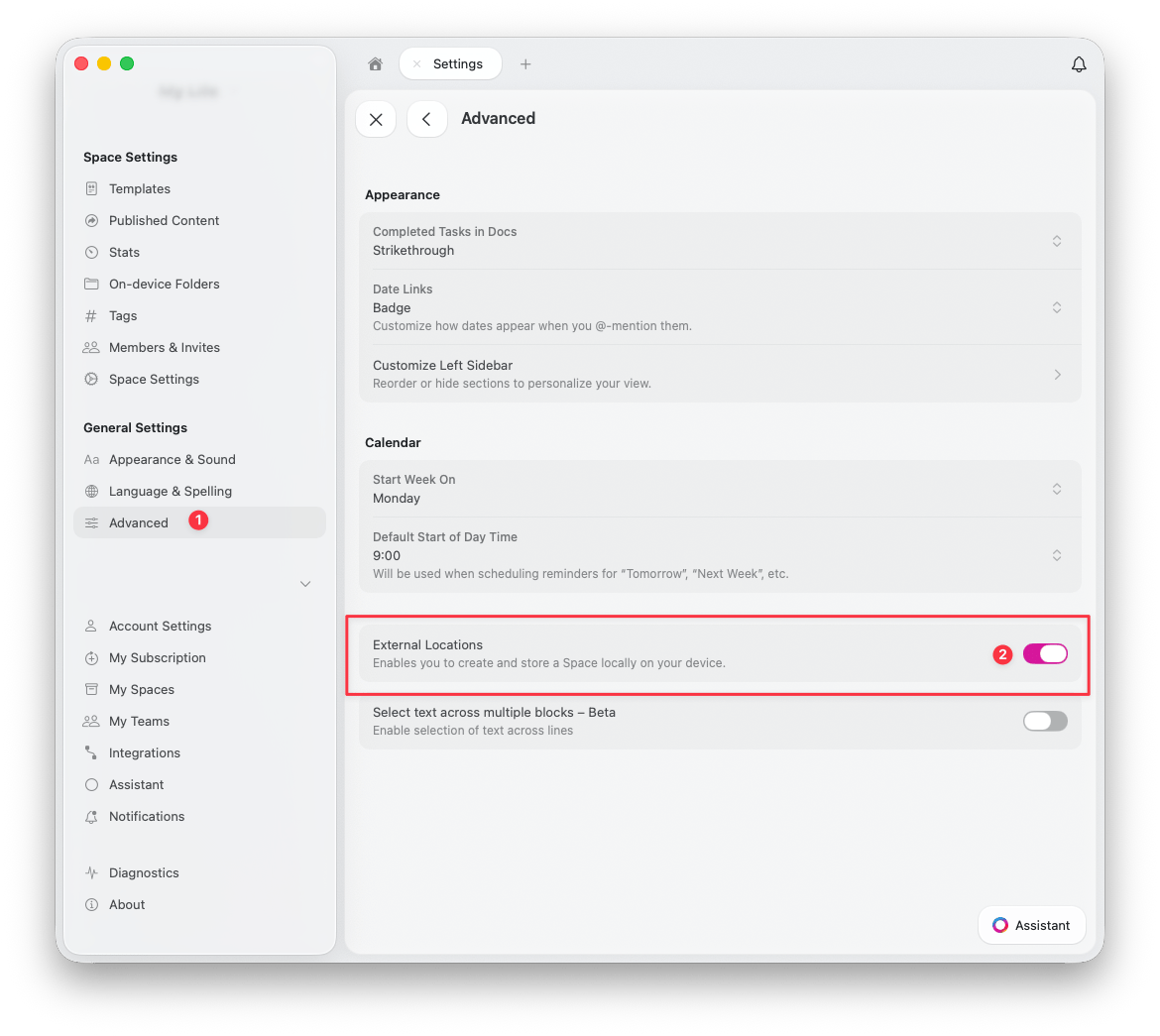
前往 **设置** > **高级**
打开 **External Locations** 开关
 ## 如何添加外部位置
启用后,你可以在 **设置** > **我的空间** 中添加外部位置:
## 如何添加外部位置
启用后,你可以在 **设置** > **我的空间** 中添加外部位置:
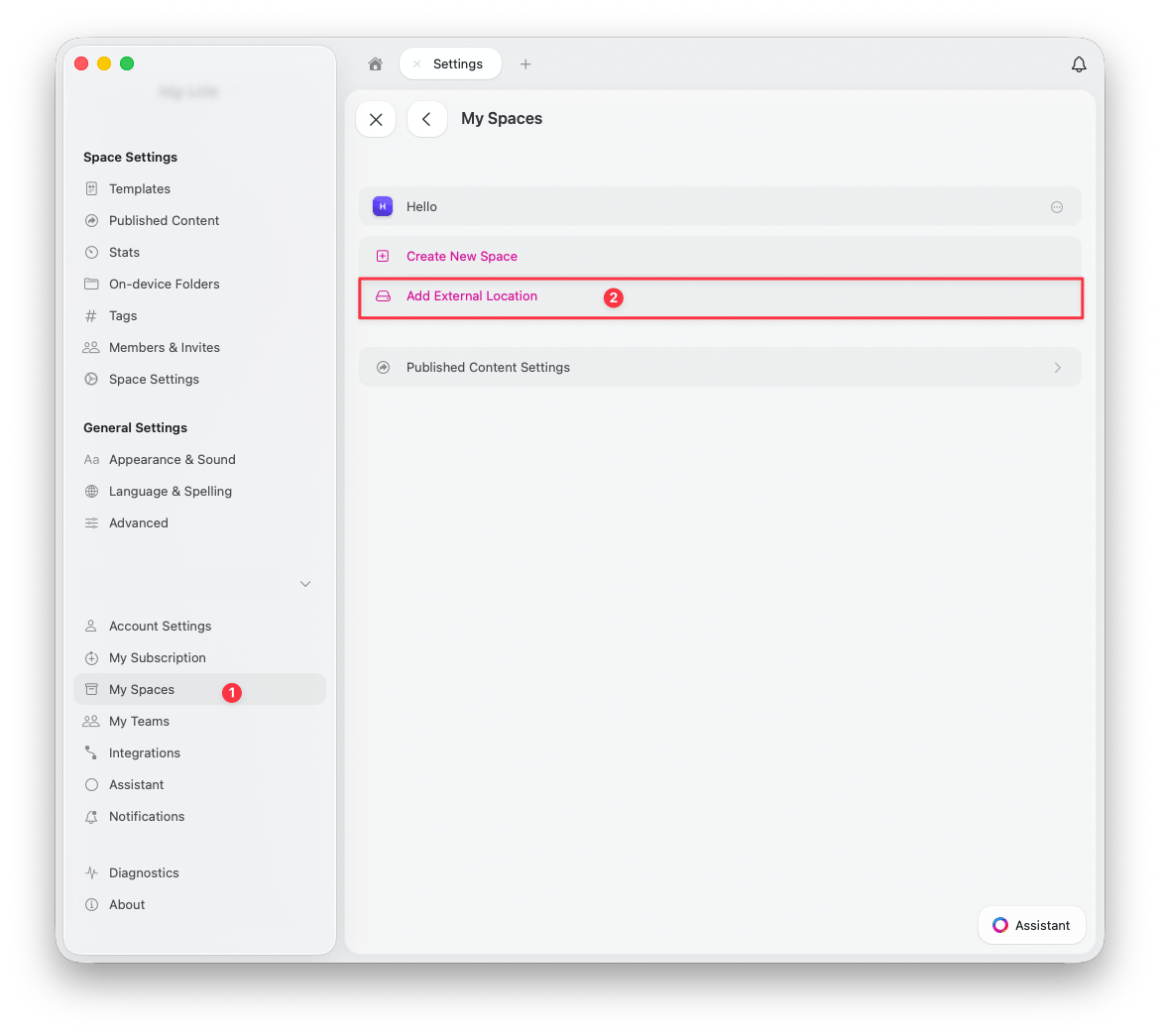 前往 **设置** > **我的空间**
点击 **Add External Location**
在你首选的位置创建或选择一个文件夹 -- 所有文档和资源都将保存在这里
## 使用第三方同步服务
### macOS
在 macOS 上,你可以完全控制存放 Craft 文档的文件夹位置。同步质量和可靠性取决于你的云服务提供商(例如 Dropbox、Google Drive 等)。
### iOS 和 iPadOS
在 iOS 和 iPadOS 上,Apple 目前不允许在选择文件夹时将大多数第三方同步服务作为位置访问。在这种情况下,唯一可用的选项是 **iCloud Drive**。
如果未来 iOS 更新有所改变,Craft 将支持最新可用的选项。
## 何时使用外部位置
外部位置适用于:
* 需要完全控制数据存放位置的用户
* 不需要云端协作功能的场景
* 单设备工作流程(不推荐用于多设备)
* 有合规性要求必须仅在本地存储的情况
## 不应使用外部位置的情况
如果你符合以下情况,应避免使用外部位置:
* 需要共享或协作处理文档
* 在多台设备上工作
* 希望无需第三方工具即可实现自动同步
* 依赖 Craft 的云端功能,例如版本历史和备份
## 需要帮助?
如果你对外部位置有疑问或需要帮助安全设置,请联系我们的支持团队。
前往 **设置** > **我的空间**
点击 **Add External Location**
在你首选的位置创建或选择一个文件夹 -- 所有文档和资源都将保存在这里
## 使用第三方同步服务
### macOS
在 macOS 上,你可以完全控制存放 Craft 文档的文件夹位置。同步质量和可靠性取决于你的云服务提供商(例如 Dropbox、Google Drive 等)。
### iOS 和 iPadOS
在 iOS 和 iPadOS 上,Apple 目前不允许在选择文件夹时将大多数第三方同步服务作为位置访问。在这种情况下,唯一可用的选项是 **iCloud Drive**。
如果未来 iOS 更新有所改变,Craft 将支持最新可用的选项。
## 何时使用外部位置
外部位置适用于:
* 需要完全控制数据存放位置的用户
* 不需要云端协作功能的场景
* 单设备工作流程(不推荐用于多设备)
* 有合规性要求必须仅在本地存储的情况
## 不应使用外部位置的情况
如果你符合以下情况,应避免使用外部位置:
* 需要共享或协作处理文档
* 在多台设备上工作
* 希望无需第三方工具即可实现自动同步
* 依赖 Craft 的云端功能,例如版本历史和备份
## 需要帮助?
如果你对外部位置有疑问或需要帮助安全设置,请联系我们的支持团队。