

Developer Mode Limitations
Developer mode is needed to add MCPs as connections.Current Restrictions
- Connections can’t be configured by members in business plan
- ChatGPT doesn’t support memory usage in developer mode
Workarounds
- Workaround 1: Turn off developer mode when you need ChatGPT native memory, turn on developer mode when you need Craft MCP
- Workaround 2: Use Craft as the agent memory – ask ChatGPT to save an excerpt of the conversation to a specific place in your document
Tool Combination Limitations
Connections can only be combined with connections inside the same message, not with other tools. Even inside the same chat, they can only be combined with web search and attachments. This means that connections can’t be used anywhere in the same chat with built-in ChatGPT functionalities like:- Deep research
- Shopping research
- Create Image
- Agent mode
- Study and learn
- Canvas
- GPTs
Workaround
Click Branch in new chat and run built-in tools in that chat. It will have the conversation history.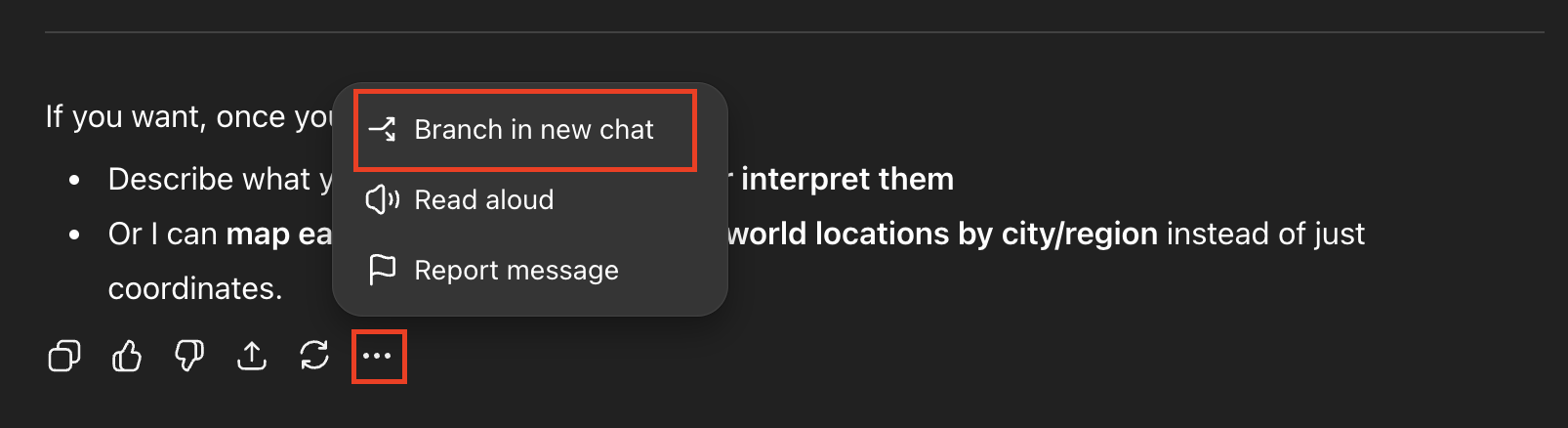
Input Type Limitations
Voice Mode
ChatGPT connections can’t be used in Voice mode. Workaround: Dictation can be combined with connections.Media in Documents
ChatGPT can’t access images, video, audio or files inside the Craft document. Workaround: Download your files and send them to ChatGPT as an attachment.Best Practices
Despite these limitations, you can still get great results with ChatGPT MCP by:- Structuring conversations to work within developer mode constraints
- Using Craft documents as the primary knowledge base
- Combining voice dictation with MCP for hands-free workflows
- Downloading media files when you need ChatGPT to analyze them