

The 5-Level Limit
The root level (no indentation) is level 0. From there, you can indent up to 5 more levels (levels 1 through 5). When you reach level 5, the indent button becomes disabled and you cannot indent further.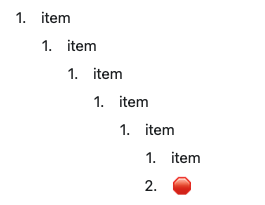
The 5-level limit is intentional, not a technical limitation. It encourages clearer document structure and ensures content remains accessible on all devices.
Why This Limit Exists
Mobile readability: On iPhone and iPad screens, deeply nested content becomes difficult to read and navigate. Five levels provide sufficient hierarchy while maintaining usability. Document clarity: Extremely deep nesting often indicates overly complex structure. The limit encourages you to break content into separate pages or reorganize for better clarity. Consistent experience: The same limit applies across Mac, iOS, Windows, and Web, ensuring your documents look and work the same everywhere.Working Within the Limit
If you find yourself hitting the 5-level limit, consider these alternatives:Use Subpages
Instead of deep nesting, create subpages to organize related content.Reorganize Content
Deep nesting might signal that content should be split: Instead of this:Use Collections
For structured data with many attributes, Collections provide a better solution than deep indentation: Instead of nesting client information 5+ levels deep, use a Collection with fields for each attribute. Each row can have its own subpage with unlimited organization.Combine with Toggles
Use toggle blocks to hide complexity without adding indentation depth:Platform Differences
The 5-level limit applies consistently across all platforms, but the way you interact with it varies: macOS: Indent withTab, outdent with Shift+Tab. The Tab key becomes inactive at level 5.
iOS/iPadOS: Use the indent buttons in the toolbar or swipe gestures. The indent button is disabled at level 5.
Windows/Web: Use Tab and Shift+Tab similar to macOS.
Common Questions
Can I request deeper nesting? The 5-level limit is a design decision that balances structure with readability. If you need deeper hierarchy, consider using subpages or Collections instead. Does this affect Collections? Collections themselves don’t have indentation limits, but content within collection cells follows the same 5-level rule. What about imported documents? When importing documents with deeper nesting (like from other apps), Craft flattens content beyond level 5 to maintain the limit.If you regularly hit the 5-level limit, it’s a signal to reconsider your document structure. Clear, focused documents with linked subpages are usually easier to navigate and maintain than deeply nested outlines.
Related Articles
Blocks and Pages
Learn about Craft’s building blocks
Creating Subpages
Organize content with nested documents
Collections
Structure complex data with database-style tables